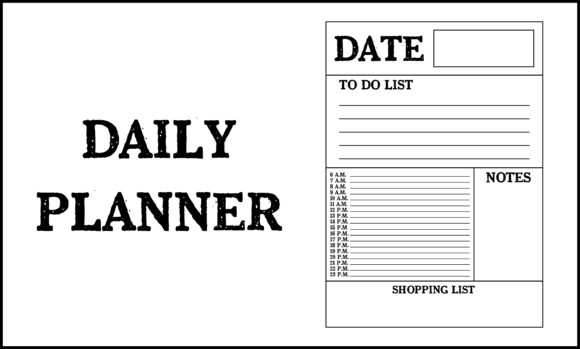
Daily Planner Design: Mastering PNG, SVG, EPS & AI Files
Creating a functional and aesthetically pleasing daily planner requires more than just good time management principles; it demands technical precision in design. Whether you are a professional stationery designer, an entrepreneur launching a digital download shop, or a hobbyist creating custom organizational tools, understanding file formats is the foundation of quality. The difference between a pixelated, unprofessional layout and a crisp, market-ready product often lies in how you handle PNG 300 DPI, SVG, EPS, and AI files. These formats serve distinct purposes in the lifecycle of a daily planner, from initial concept to final print or digital distribution.
A daily planner is ultimately a tool for cognitive offloading. It helps users organize tasks, track habits, and visualize their time. However, the utility of this tool is directly impacted by its legibility and visual clarity. When designers prioritize high-resolution standards and scalable vector graphics, they ensure that the end-user experiences no friction when reading small text, writing in designated boxes, or viewing the planner on high-density screens. Technical excellence supports the practical goal of organization.
The Critical Role of 300 DPI PNG in Print Clarity
For any daily planner intended for physical printing, resolution is non-negotiable. The industry standard for professional printing is 300 DPI (dots per inch). While web images typically display at 72 DPI, using that resolution for a printed planner results in blurry lines and illegible text. A daily planner relies heavily on fine details: thin grid lines, small date numbers, and intricate decorative elements. At lower resolutions, these elements degrade, making the planner frustrating to use.
PNG files at 300 DPI are particularly valuable because they support transparency without the compression artifacts found in JPEGs. This is essential when designing planner stickers, overlay elements, or modular inserts. For example, if you are creating a set of "Priority Task" badges to be printed on sticker paper, a 300 DPI PNG ensures the edges remain sharp against any background color. This format preserves the integrity of line art and text, which is vital for maintaining the clean aesthetic that makes a daily planner effective.
However, users should understand the limitations of PNG. As a raster format, it is resolution-dependent. Scaling up a 300 DPI PNG beyond its original dimensions will result in quality loss. Therefore, PNGs should always be exported at the final intended size or larger. For designers, this means setting up your canvas correctly from the start. If your daily planner page is 8.5 x 11 inches, your document must be set to 300 DPI at those exact dimensions before exporting.
Leveraging SVG for Digital Planning and Scalability
The rise of digital planning on tablets has shifted the technical requirements for daily planners. Unlike print, digital screens vary wildly in size and pixel density. This is where SVG (Scalable Vector Graphics) becomes indispensable. Because SVGs are defined by mathematical paths rather than pixels, they remain perfectly crisp whether viewed on a compact phone screen or a large desktop monitor. For digital daily planners, SVG ensures that checkboxes, icons, and navigation tabs never appear fuzzy.
Beyond visual clarity, SVG offers significant functional advantages for digital products. File sizes are typically much smaller than high-resolution PNGs, which improves loading times and app performance. For creators selling digital planner bundles, offering SVG assets allows customers to customize colors and sizes within compatible software without degrading quality. This flexibility enhances the user experience, allowing individuals to adapt a generic daily planner template to their specific visual preferences or accessibility needs.
When integrating SVG into a daily planner workflow, it is important to optimize the code. Complex vectors with thousands of anchor points can slow down rendering. Simplifying paths and removing unnecessary metadata ensures that the planner remains responsive. This technical consideration directly impacts usability; a laggy digital planner defeats the purpose of efficient time management.
Professional Production with EPS and AI Source Files
While PNG and SVG are delivery formats, EPS and AI are production powerhouses. Adobe Illustrator (AI) files serve as the master source for most professional daily planner designs. Working in AI allows designers to manipulate typography, adjust layouts, and manage color profiles with precision that raster software cannot match. For a daily planner, where alignment and consistency are paramount, vector-based editing ensures that every margin, gutter, and grid line is mathematically perfect.
EPS (Encapsulated PostScript) acts as a universal vector exchange format. If you collaborate with a commercial printer or hire a freelance designer who uses different software, EPS ensures compatibility. It retains vector data, meaning the recipient can scale and edit the daily planner layout without quality loss. This is particularly relevant for entrepreneurs outsourcing production or publishers managing multiple contributors. Maintaining access to the editable source file protects your investment and allows for future updates, such as changing the year or adjusting holiday dates, without recreating the design from scratch.
Users comparing options should note that AI and EPS files require specialized software to edit. They are not consumer-facing formats. If you are purchasing a daily planner template for personal use and do not own Adobe Illustrator or similar vector software, prioritize packages that include pre-exported PNG or PDF versions alongside the source files.
Matching File Formats to Specific User Goals
Selecting the right format depends entirely on the intended outcome. There is no single best format; there is only the right format for the specific task. Understanding this distinction saves time and prevents costly reprinting errors.
- For Commercial Printing: Always verify printer specifications, but generally, 300 DPI PNG or PDF (exported from AI/EPS) is required. Ensure color mode is CMYK to avoid unexpected color shifts in the final daily planner.
- For Digital Stickers and Icons: Use transparent PNG at 300 DPI for compatibility with apps like GoodNotes, or SVG for infinite scaling and smaller file sizes.
- For Template Customization: Acquire AI or EPS source files. Rasterized PNGs cannot be edited structurally, limiting long-term utility.
- For Web Previews and Marketing: Use optimized PNG or JPG at 72-150 DPI. High-resolution print files will slow down your website and offer no benefit to screen viewers.
Navigating Limitations and Quality Control
Even with the correct formats, pitfalls exist. One common issue is color space mismatch. A vibrant RGB daily planner design may look dull when converted to CMYK for print. Designers should proof colors early in the process. Another consideration is font licensing. Just because you have the AI file does not mean you have the commercial license to distribute the fonts embedded within it. Outlining text converts letters to shapes, solving licensing issues for print but eliminating editability. Balance these factors based on whether the daily planner is a finished product or an editable template.
Additionally, consider the end-user's technical literacy. Selling an AI-only daily planner to a general consumer audience will lead to support requests and refunds. Conversely, providing only flattened PNGs to professional designers limits their ability to customize. Clear communication about what each file type offers manages expectations effectively. Label files descriptively, such as "Print-Ready-300DPI.png" or "Editable-Source.ai," to reduce confusion.
Ultimately, the technical specifications of a daily planner are not merely administrative details; they are integral to the product's value. High-quality assets respect the user's time and effort. When a planner prints clearly, scales perfectly on screen, and allows for easy modification, it removes barriers to organization. By mastering the interplay between PNG 300 DPI, SVG, EPS, and AI files, creators deliver tools that truly support productivity and creativity. Investing time in proper file management yields dividends in customer satisfaction, professional reputation, and personal efficiency.