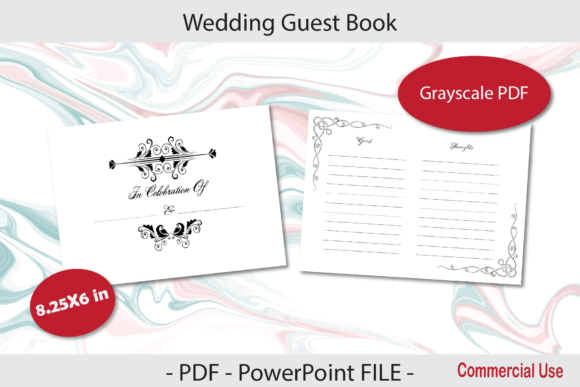
Wedding Guest Book for KDP 8.25X6 in: A Practical Guide to Interior Design and Production
Creating a successful low-content book requires more than just uploading a file; it demands an understanding of physical production constraints and user experience. When developing a Wedding Guest Book for KDP 8.25X6 in, you are working with a specific trim size that offers distinct advantages over standard letter or A4 formats. This landscape orientation mimics traditional photo albums and guest registers, providing a wider canvas for handwriting and decorative elements. However, this unique dimension also introduces technical challenges that can ruin a project if overlooked during the design phase.
Many creators focus heavily on cover aesthetics while neglecting the functional reality of the interior. A wedding guest book is a tactile object meant to be used during a high-stress event. If the interior layout is confusing, the margins are too tight, or the paper quality expectations are mismatched with the design density, the final product will fail regardless of how beautiful the cover appears. Understanding the nuances of the 8.25 x 6-inch format ensures your KDP interior is not only printable but genuinely useful for couples on their special day.
Understanding Bleed and Safe Zones in Landscape Formats
The most frequent technical error in KDP interiors involves miscalculating bleed for landscape orientations. When your Wedding Guest Book for KDP Interior is designated as "With Bleed," the document size must be larger than the final trim size. For an 8.25 x 6-inch book with bleed, your PDF or PowerPoint file must measure 8.375 x 6.125 inches. This extra 0.125 inches on the top, bottom, and outside edge allows for mechanical variance during trimming.
A common misunderstanding is applying bleed uniformly to all four sides. In KDP paperback binding, the inside margin (gutter) does not have bleed because it is bound into the spine. Adding bleed to the gutter side creates alignment issues and can push content dangerously close to the binding. Many beginners create a symmetrical 8.5 x 6.25-inch document, assuming equal bleed on all sides, which results in rejection or misaligned pages. Always verify that your template accounts for the non-bleed gutter edge specifically for landscape bindings.
Beyond technical dimensions, safe zones are critical for usability. Text and essential design elements should remain at least 0.375 inches from the trim edge on the outside, top, and bottom, and significantly further from the gutter. In a landscape guest book, the gutter eats into the writing space. Failing to increase the inner margin results in guests struggling to write near the spine, creating a frustrating user experience. A practical approach is to set your inner margin to at least 0.75 inches for a 150-page book to accommodate the page curvature.
Paper Quality Limitations and Ink Saturation
KDP standard color books utilize 55# (90 GSM) white paper. This is crucial context for any Wedding Guest Book for KDP 8.25X6 in. While black and white printing is cost-effective and classic, heavy ink coverage can cause show-through or warping on this paper weight. Designers often create dense, solid-black backgrounds or intricate grayscale patterns that look excellent on screen but translate poorly to uncoated standard paper.
To maintain quality and prevent bleed-through:
- Avoid solid black blocks: Use line art, stippling, or light gray tones instead of heavy fills.
- Test opacity: If using digital tools, preview designs at 100% zoom with a simulated uncoated paper texture.
- Mind the reverse side: Ensure that heavy graphics on the left page do not interfere with writing lines on the right page.
- Limit grayscale gradients: Smooth gradients often band or print muddy on standard KDP presses; opt for flat colors or distinct patterns.
This limitation is not a barrier to creativity but a constraint that guides better design decisions. Elegant, minimalist layouts typically perform better functionally and aesthetically in guest books than busy, high-contrast designs. Remember that guests will be using various pens, including gel and fountain pens, which require a paper surface that isn't already saturated with printer ink.
Functional Layout vs. Decorative Excess
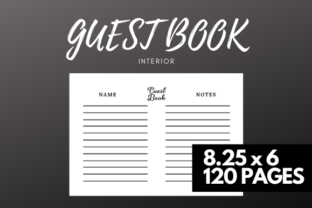
A beautiful interior that lacks functionality is a failed product. When evaluating a Wedding Guest Book for KDP Interior, prioritize the guest's interaction over artistic expression. The primary purpose is data collection: names, addresses, and messages. Overly decorative prompts or cramped spacing can discourage participation.
Consider the hierarchy of information. Name fields should be prominent and spacious. Address lines should be clearly separated. Message areas need adequate vertical space for varying handwriting sizes. A common mistake is allocating equal space to all fields, resulting in tiny boxes for names and excessive whitespace for messages, or vice versa. Analyze real-world guest books to understand natural writing flow. Most guests write their name large and their message small; adjust your line spacing accordingly.
Additionally, consider the "coordinating title page" mentioned in many premium templates. This page sets the tone but should not consume valuable writing real estate. Keep introductory content concise. In a 150-page book, losing ten pages to excessive front matter reduces the utility of the guest book. Every page should serve the couple's long-term memory preservation. Practical advice includes placing the title page and copyright info efficiently so that the first usable guest entry appears as early as possible, ideally within the first three to five pages.
File Preparation: PowerPoint vs. PDF Workflows
While many creators prefer professional layout software, PowerPoint remains a popular tool for KDP interiors due to its accessibility. However, PowerPoint is not native to print production, leading to specific pitfalls. Fonts may substitute unexpectedly, images may shift during export, and slide dimensions can revert to defaults upon reopening.
If utilizing a PowerPoint file for your Wedding Guest Book for KDP 8.25X6 in:
- Embed all fonts: Go to File > Options > Save and check "Embed fonts in the file." Choose "Embed all characters" to prevent substitution errors.
- Lock slide size: Verify dimensions immediately before exporting. PowerPoint sometimes resets custom sizes when switching between devices.
- Export correctly: Never save as PDF directly from the "Save As" menu. Use "Export" or "Print to PDF" with high-quality settings to preserve resolution.
- Flatten transparency: Complex layering in PPT can cause rendering artifacts. Consider exporting slides as high-res PNGs and reassembling them in a dedicated PDF tool if transparency issues persist.
PDF files are generally safer for final upload, but they must be validated. Always open your final PDF in a viewer that displays actual print dimensions, not "fit to screen." Measure the gutter and outer margins digitally to confirm compliance. What looks correct in edit mode may shift during PDF conversion. This verification step takes minutes but prevents days of rejection delays.
Evaluating Templates Before Purchase or Download
Whether buying a premade interior or downloading a free resource, critical evaluation is necessary. Do not assume a template labeled "8.25x6" is production-ready. Check the following before committing:
- Exact Dimensions: Confirm whether the file includes bleed allowance or is exact trim size.
- Page Count Alignment: Ensure the template matches your intended 150-page count. Adding or removing pages later can disrupt alternating header/footer designs.
- Licensing Terms: Verify commercial use rights specifically for KDP. Some licenses prohibit using the interior "as-is" without significant modification.
- Editability: Test the file before purchasing if possible. Locked layers or corrupted master slides can make customization impossible.
The goal is to create a product that respects both the manufacturing process and the end user. By addressing these technical and functional considerations upfront, you transform a simple digital file into a cherished physical artifact. Success in KDP low-content publishing comes from mastering these invisible details that ensure quality, usability, and customer satisfaction.